
Docker supply chain hardening — from Scout D to OpenSSF 7.8 on a 730K-pull image
By Vladimir Mikhalev · Docker Captain · CNCF Ambassador · IBM Champion
Earlier this month my public Docker image heyvaldemar/aws-kubectl held a Docker Scout grade of D. It had crossed 730,000 pulls on Docker Hub. That same image now holds a Scout grade of B and an OpenSSF Scorecard of 7.8 out of 10, well above the typical score for public utility images. I read the configuration line by line. I shipped three major phases. And I hit one production incident that cost me a full afternoon.
You see the same pattern everywhere. Banking. Telecom. Cloud-native. A utility image gets adopted because it works, pulls climb into six figures, and nobody touches the Dockerfile for years. Defaults that shipped in 2023 are still the defaults in production in 2026. So if you maintain a public image with real adoption and you have never audited it against current supply chain expectations, what follows is the checklist I wish I had kept from day one. For the performance side of the same site rebuild that preceded this work, see the Cloudflare Web Analytics migration that unlocked Lighthouse 100.
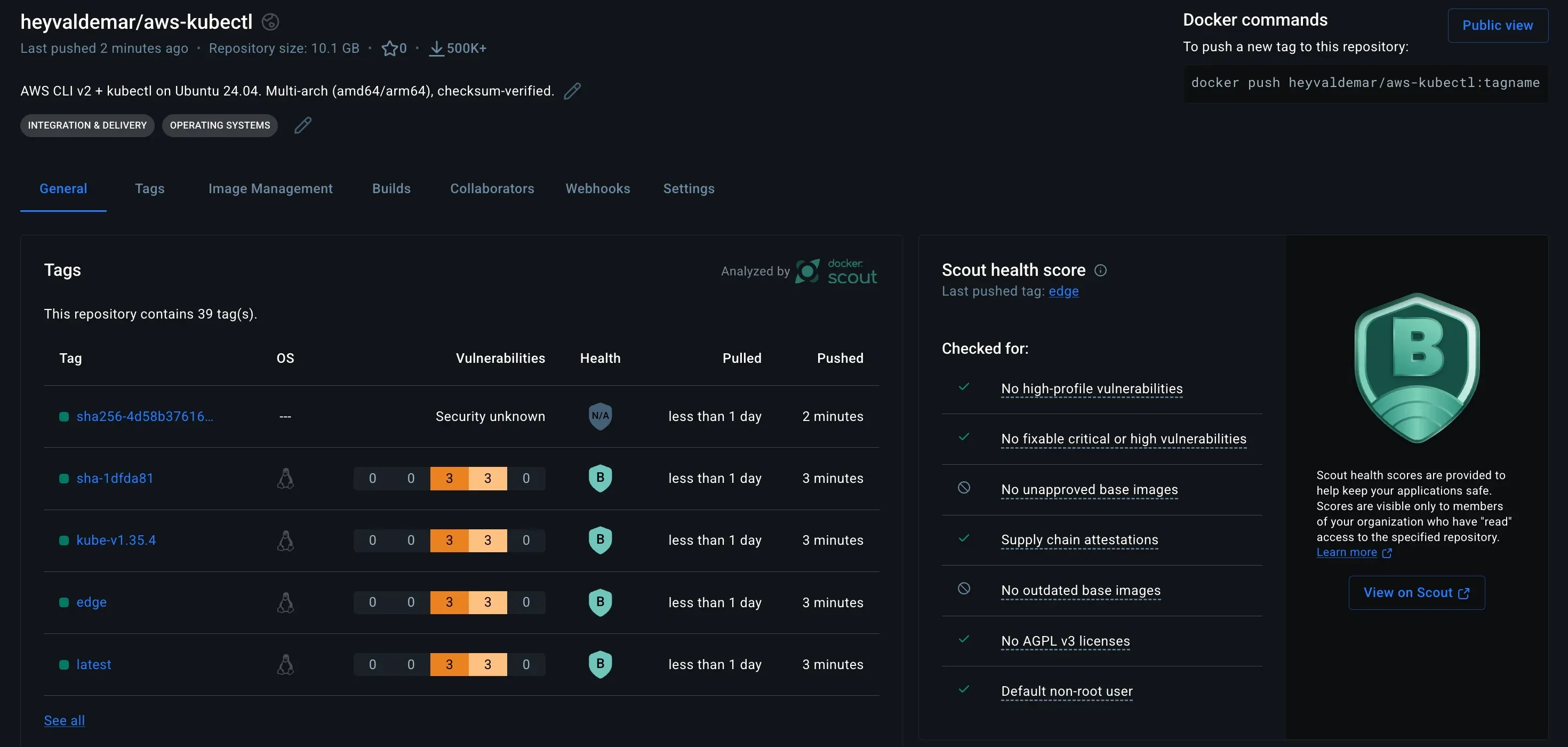
What grade D actually looked like
The starting Dockerfile was the version most maintainers will recognize on sight. One stage. A FROM ubuntu:24.04 with no digest. apt-get install for curl and unzip. A bash loop to pull the AWS CLI zip and the kubectl binary. No USER directive, so the container runs as root by default. No OCI labels. No hadolint. No lockfile for the base image.
# Before: single stage, implicit root, no labels, no digest pinFROM ubuntu:24.04
RUN apt-get update && apt-get install -y curl unzip \ && curl -o awscliv2.zip https://awscli.amazonaws.com/awscli-exe-linux-x86_64.zip \ && unzip awscliv2.zip && ./aws/install \ && curl -LO https://dl.k8s.io/release/$(curl -L -s https://dl.k8s.io/release/stable.txt)/bin/linux/amd64/kubectl \ && install kubectl /usr/local/bin/kubectl
ENTRYPOINT ["/bin/bash"]The secure version after Phase 3 is a different image entirely. Multi-stage, so the build tools never ship in the runtime. Base digest pinned. An explicit USER 10001:0 so the container runs as a non-root account with root group (GID 0) for OpenShift SCC compatibility. A full set of OCI labels so Scout and GitHub actually know what they are scanning. The example below shows the structural changes only; the production Dockerfile in the repo additionally ships jq, envsubst, curl, and unzip in the runtime, writes the resolved kubectl version to /etc/kube-version as a drift-detection marker, and uses /usr/local/aws-cli as the AWS CLI install path.
# After: multi-stage, digest-pinned, non-root, OCI-labeledFROM ubuntu:24.04@sha256:c4a8d5503dfb2a3eb8ab5f807da5bc69a85730fb49b5cfca2330194ebcc41c7b AS builder
ARG KUBE_VERSION=latestRUN apt-get update && apt-get install -y --no-install-recommends \ ca-certificates curl unzip \ && curl -fsSL -o /tmp/awscliv2.zip \ https://awscli.amazonaws.com/awscli-exe-linux-x86_64.zip \ && unzip -q /tmp/awscliv2.zip -d /tmp \ && /tmp/aws/install -i /opt/aws-cli -b /usr/local/bin \ && curl -fsSL -o /usr/local/bin/kubectl \ https://dl.k8s.io/release/${KUBE_VERSION}/bin/linux/amd64/kubectl \ && echo "$(curl -fsSL https://dl.k8s.io/release/${KUBE_VERSION}/bin/linux/amd64/kubectl.sha256) /usr/local/bin/kubectl" | sha256sum -c - \ && chmod +x /usr/local/bin/kubectl
FROM ubuntu:24.04@sha256:c4a8d5503dfb2a3eb8ab5f807da5bc69a85730fb49b5cfca2330194ebcc41c7b AS final
LABEL org.opencontainers.image.source="https://github.com/heyvaldemar/aws-kubectl-docker"LABEL org.opencontainers.image.licenses="MIT"LABEL org.opencontainers.image.description="AWS CLI v2 + kubectl on Ubuntu 24.04"
RUN apt-get update && apt-get install -y --no-install-recommends \ ca-certificates \ && rm -rf /var/lib/apt/lists/* \ && useradd --system --uid 10001 --gid 0 --create-home --home-dir /home/app --shell /sbin/nologin --comment "aws-kubectl runtime user" app \ && chmod -R g=u /home/app
COPY --from=builder /opt/aws-cli /opt/aws-cliCOPY --from=builder /usr/local/bin/kubectl /usr/local/bin/kubectlRUN ln -s /opt/aws-cli/v2/current/bin/aws /usr/local/bin/aws
USER 10001:0WORKDIR /home/appENV HOME=/home/app
CMD ["bash"]The production Dockerfile’s
KUBE_VERSIONARG defaults tolatestand resolves to the current stable release at build time via kubectl’sstable.txtchannel; the example above keeps the same default, with the resolution logic elided for readability.
That missing USER directive is one of the most common findings in container security audits. In regulated industries it shows up as a late-stage compliance blocker. In security post-mortems it maps to privilege-escalation and lateral-movement patterns documented across years of incident reporting. In cloud-native environments it is the reason OpenShift restricted-v2 SCC refuses your pod. One line. Skip it, and the cost compounds every year the image gets pulled.
Full source, including CI workflows, the SECURITY.md disclosure policy, and the v1-maintenance migration guide, lives at github.com/heyvaldemar/aws-kubectl-docker.
Why this keeps happening
Sonatype’s 2024 State of the Software Supply Chain report logged 512,847 malicious open-source packages over the preceding year. A 156% rise year-over-year.
Containers are a smaller slice of that total than npm or PyPI. The propagation model is the same. A base image ships, downstream teams pull it, and the maintainer’s attack surface becomes the attack surface of every production cluster that pulled it. One compromised personal access token reaches a cluster in Frankfurt and a cluster in Singapore by the next morning, because the image digest has already rolled out through the nightly base rebuilds in both places.
Then there is the silence between the build and the consumer. Most public images carry no signature, no SBOM, no build provenance. A pull resolves a tag to a digest. That is the entire audit trail. Sigstore fixed the signing cost by making keyless cosign verification free through GitHub OIDC. BuildKit fixed the SBOM and provenance cost by making both a single build flag. The reason most images still ship without them is not that the tooling is hard. It is that nobody ran the migration.
And there is recency. OpenSSF Scorecard is new enough that most maintainers have never seen their own score. Running it once is a ten-minute workflow. Run it today and most public images would come back somewhere between 3 and 5.
Risk and blast radius
Direct exposure scales with pulls. Past 730,000 the image is well beyond the threshold where a single supply chain compromise reaches hundreds of downstream CI pipelines inside days. The pulls counter is an adoption metric. It is also a blast radius metric.
Systemic exposure is the harder calculation. A single maintainer account. A single personal access token with write:packages. A single compromised laptop. The OWASP Top 10 for CI/CD Security captures these as CICD-SEC-2 (Inadequate Identity and Access Management) and CICD-SEC-6 (Insufficient Credential Hygiene), and the attack pattern that dominated 2024 was exactly this chain. Hardening the build pipeline matters more than hardening the runtime of the image itself, because the runtime is downstream of whoever signed the image.
Regulatory exposure depends on who pulled the image. If any consumer runs it in a workload subject to EU NIS2, US Executive Order 14028, or financial regulatory frameworks that require SBOM attestations, the maintainer is inside the trust chain whether the maintainer asked to be there or not.
Options compared
For a solo maintainer the trade-off space is narrower than it is for a funded team. The table below is the honest comparison for public utility images under 1 GB.
| Approach | Setup cost | Ongoing cost | Scorecard ceiling | Fit |
|---|---|---|---|---|
| Do nothing | 0 hours | 0 hours/month | ~3/10 | High risk above 100K pulls |
| Multi-stage + lint only | 4 hours | 30 min/month | ~5/10 | Minimum viable for public image |
| Add cosign + SBOM + SLSA | 8 hours | 30 min/month | ~7/10 | Recommended above 250K pulls |
| Full hardening + non-root | 16 hours | 1 hour/month | ~7.8/10 | Required for enterprise downstream use |
| Full + CII Best Practices badge | 40 hours | 2 hours/month | ~8.5/10 | Worth it only for funded projects |
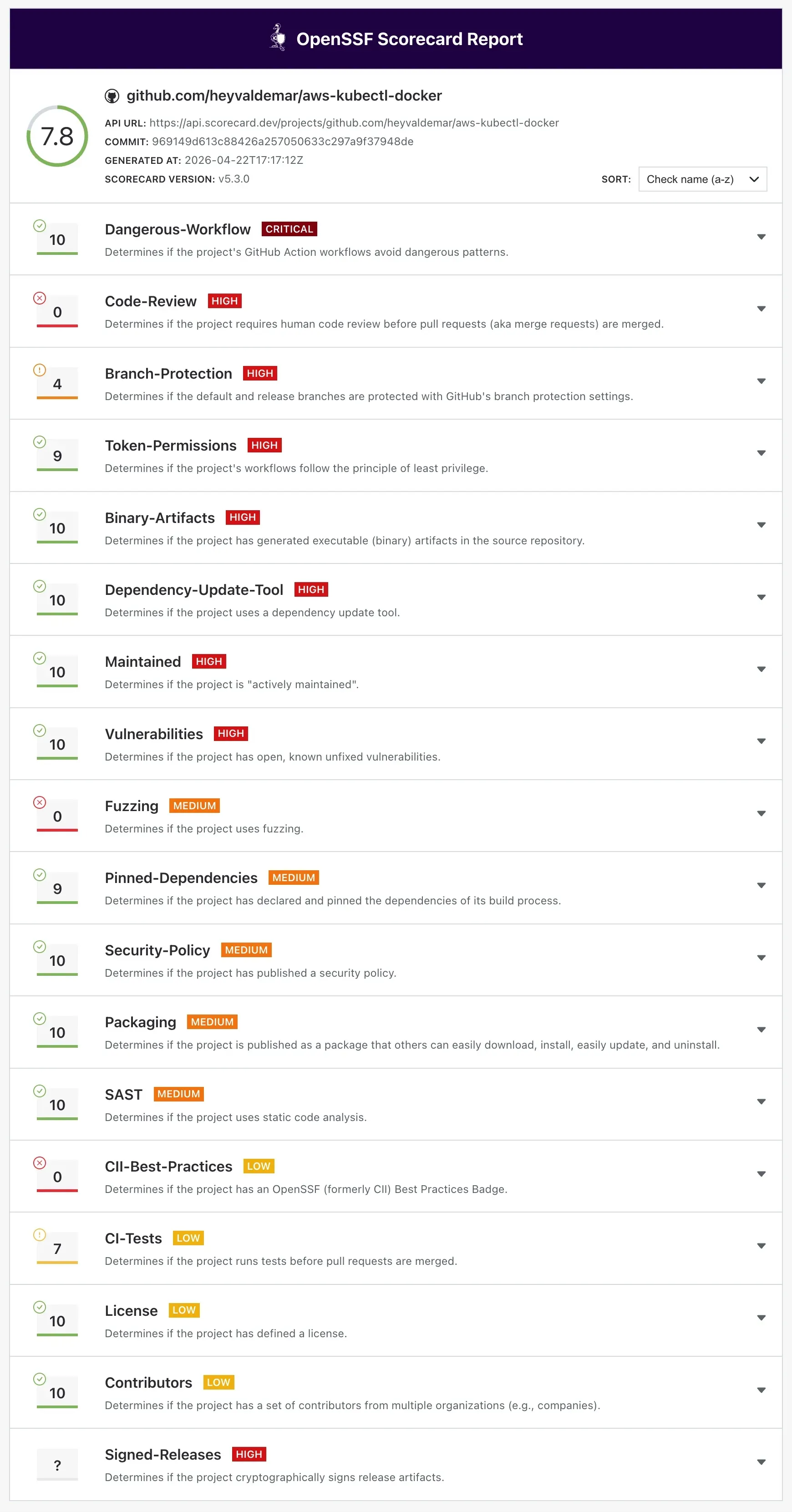
The jump from 5 to 7 costs four hours once. The jump from 7 to 7.8 costs another eight hours plus a breaking release. Getting from 7.8 to 8.5 costs forty hours of process overhead and tops out at a ceiling you do not control. I stopped at 7.8. For a solo maintainer the marginal return on the next tier goes negative.
Framework: supply chain hardening for solo maintainers
Three layers. Each one is a deploy cycle. The names track the migration topic family on purpose, because this is a migration from insecure defaults to attested defaults, not a fresh build from scratch.
Layer 1: inventory
The first goal is the audit, not the fix. You cannot harden what you have not measured.
# Layer 1: run once before any changes# 1. Current Scorecard baselinedocker run -e GITHUB_AUTH_TOKEN=$GITHUB_TOKEN gcr.io/openssf/scorecard:stable \ --repo=github.com/OWNER/REPO --show-details
# 2. Current Scout gradedocker scout quickview OWNER/IMAGE:latest
# 3. Trivy CVE baselinetrivy image --severity HIGH,CRITICAL OWNER/IMAGE:latest
# 4. Pin every base image to a digest and save the old Dockerfilegit mv Dockerfile Dockerfile.baselineRun all four. Save the output. That Scorecard baseline is what you compare against once the hardening lands. On my run the starting numbers were Scout grade D, an OpenSSF score in the low single digits, and several HIGH CVEs from apt package lag.
Owner: the single maintainer.
Layer 2: parallel run
Phase 1. Multi-stage build. OCI labels. Hadolint in CI.
Phase 2. Cosign keyless signing. SBOM generation. SLSA build provenance. Trivy SARIF upload.
Phase 3. Non-root USER 10001 breaking release, plus a v1-maintenance floating tag for users who cannot migrate inside the window. Semver tags are kept forever by the tag cleanup policy and are the recommended target for production pins.
The signing job is the piece that earns the Cosign Verified badge and the SLSA provenance:
# Layer 2: .github/workflows/publish.yml (signing + attestation)permissions: contents: read id-token: write packages: write attestations: write
jobs: build: runs-on: ubuntu-latest outputs: digest: ${{ steps.build.outputs.digest }} steps: - uses: actions/checkout@de0fac2e4500dabe0009e67214ff5f5447ce83dd # v6
- uses: docker/setup-buildx-action@4d04d5d9486b7bd6fa91e7baf45bbb4f8b9deedd # v4
- uses: docker/login-action@4907a6ddec9925e35a0a9e82d7399ccc52663121 # v4 with: username: ${{ secrets.DOCKERHUB_USERNAME }} password: ${{ secrets.DOCKERHUB_TOKEN }}
- id: build uses: docker/build-push-action@bcafcacb16a39f128d818304e6c9c0c18556b85f # v7 with: platforms: linux/amd64,linux/arm64 push: true provenance: mode=max sbom: true tags: ${{ env.IMAGE }}:${{ env.VERSION }}
- uses: actions/attest-build-provenance@a2bbfa25375fe432b6a289bc6b6cd05ecd0c4c32 # v4.1.0 with: subject-name: ${{ env.IMAGE }} subject-digest: ${{ steps.build.outputs.digest }} push-to-registry: false
- uses: sigstore/cosign-installer@cad07c2e89fa2edd6e2d7bab4c1aa38e53f76003 # v4.1.1 with: cosign-release: "v2.6.1"
- run: | set -euo pipefail echo "${TAGS}" | while IFS= read -r tag; do [ -z "$tag" ] && continue cosign sign --yes "${tag}@${DIGEST}" done env: TAGS: ${{ steps.meta.outputs.tags }} DIGEST: ${{ steps.build.outputs.digest }}Incident postmortem. During Phase 2 I first shipped the workflow above with
push-to-registry: true. The signing step succeeded. The attestation push failed. Docker Hub’s OCI referrers API silently rejected the credential handoff from the workflow. I re-ran the publish job withpush-to-registry: falseand shipped the fix as a hotfix. The fix is to keep attestations in GitHub Attestations (where they are retrievable by anyone with the digest) and skip the registry push until Docker Hub stabilizes its referrers behavior. Root cause: the referrers API expects a specific OCI 1.1 header format that theactions/attest-build-provenancev3 action does not negotiate cleanly against Docker Hub’s current implementation. GHCR works. Docker Hub does not.
A second regression surfaced five days later, when I turned on Docker Hub tag immutability. The publish workflow had been generating a kube-v* tag on every push event, and that collided with the immutability policy and aborted the build before the cosign step could run. So main pushes shipped a new :latest digest each time without ever signing it. The fix scoped the kube-v* tag to semver release events only, and added set -euo pipefail plus per-tag error handling to the signing step shown above so future failures fail loud rather than silent. Floating tags are signing reliably again as of late April.
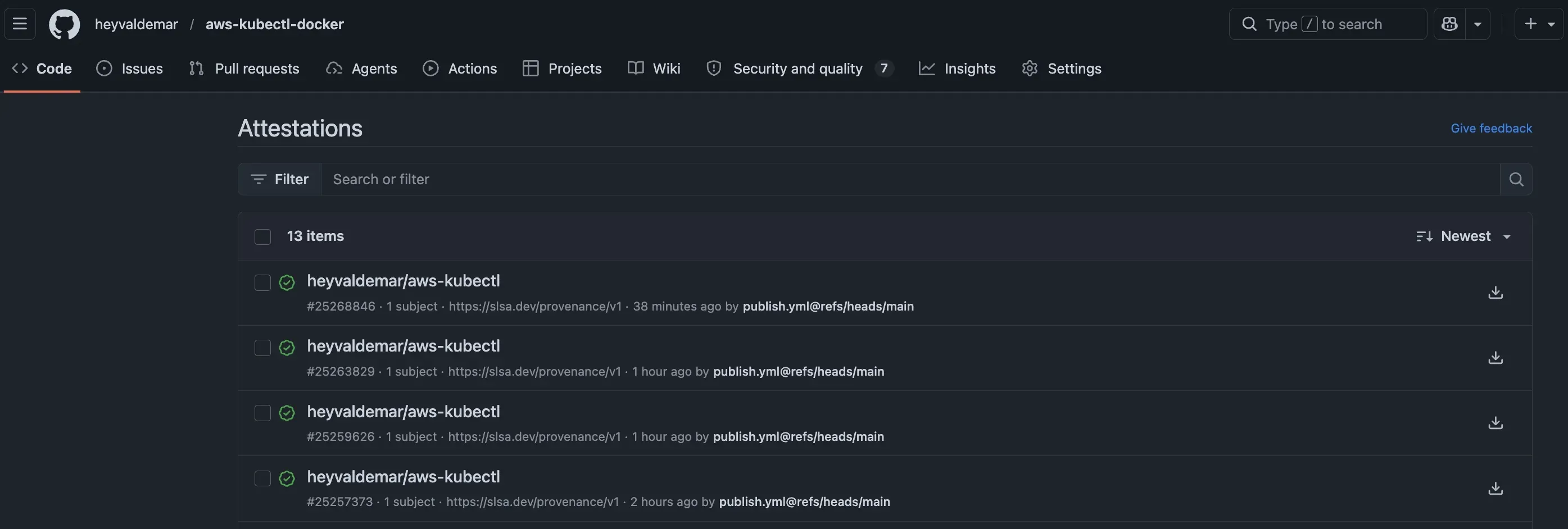
After Phase 2 the image carries keyless cosign signatures, an SPDX SBOM, and SLSA build provenance at mode=max, all traceable to the exact GitHub Actions run that produced them. After Phase 3 the default user is UID 10001 with GID 0, so the image drops straight into OpenShift restricted-v2 with no securityContext override.
Owner: the single maintainer.
Layer 3: cutover and continuous verification
Weekly automation is what holds the score at 7.8 instead of letting it drift back to 5 over time.
on: schedule: - cron: '0 6 * * 2' # Tue 06:00 UTC push: branches: [main]
permissions: read-all
jobs: analysis: runs-on: ubuntu-latest permissions: security-events: write id-token: write steps: - uses: actions/checkout@de0fac2e4500dabe0009e67214ff5f5447ce83dd # v6 with: persist-credentials: false
# Pinned to commit SHA, not tag SHA (annotated tags dereference differently) - uses: ossf/scorecard-action@4eaacf0543bb3f2c246792bd56e8cdeffafb205a # v2.4.3 with: results_file: results.sarif results_format: sarif publish_results: true
- uses: github/codeql-action/upload-sarif@95e58e9a2cdfd71adc6e0353d5c52f41a045d225 # v4.35.2 with: sarif_file: results.sarifThe comment on that Scorecard action pin is not paranoia. I hit an imposter commit error on the first publication attempt. Git has had two tag types since 2005: lightweight tags point directly at a commit SHA, and annotated tags point at a tag object that wraps the commit SHA. GitHub’s git/refs/tags/:tag API returns whichever SHA the tag ref resolves to. Annotated tag in, annotated tag object SHA out. Scorecard rejects annotated tag object SHAs during its own verification step because they are not commit SHAs.
The fix is a second API call:
# Annotated tag: first call returns tag object SHAgh api repos/ossf/scorecard-action/git/refs/tags/v2.4.3 --jq '.object'# {"sha":"99c09fe...","type":"tag"}
# Dereference: second call returns the commit SHAgh api repos/ossf/scorecard-action/git/tags/99c09fe... --jq '.object'# {"sha":"4eaacf0543bb3f2c246792bd56e8cdeffafb205a","type":"commit"}
# Pin the commit SHA, not the tag object SHA# uses: ossf/scorecard-action@4eaacf0543bb3f2c246792bd56e8cdeffafb205aA twenty-year-old distinction in Git. The kind that only breaks your publication on the day you need it to work.
Weekly base rebuild, weekly Scorecard re-run, weekly Docker Hub tag cleanup. Together they keep the maintenance budget under two hours a month. A tag retention policy that deletes sha-* tags older than 90 days keeps the tag list readable by humans and scanners alike. One caveat: users pinning by digest should pin to digests that are also referenced by a semver tag, so that purged sha-* tags do not orphan the digest.
Owner: the single maintainer, with Dependabot as the junior engineer that ships 80% of the ongoing patches.
Tradeoffs
The full program costs sixteen hours of initial work and roughly one hour a month of ongoing review. At typical senior DevOps contractor rates, that is a single billable sprint up front and a fraction of a day per month after.
Now price the alternative. A supply chain incident response engagement, forensics and containment and downstream notification, costs multiples more than a preventive hardening program’s entire first-year budget. An SBOM attestation audit finding inside an enterprise procurement cycle can delay or kill multi-year contracts. The asymmetry is the whole argument. Look at the Codecov bash uploader compromise in 2021: it exposed credentials from customer CI environments across a two-month window before anyone detected it, through a single injected line of shell. Shell script, not container. Same propagation graph as a signed-nothing Docker image today.
The breaking release in Phase 3 costs a migration window, a v1-maintenance floating tag, and a migration guide in the README. Downstream teams can pin to v1-maintenance while they budget for a container base image bump.
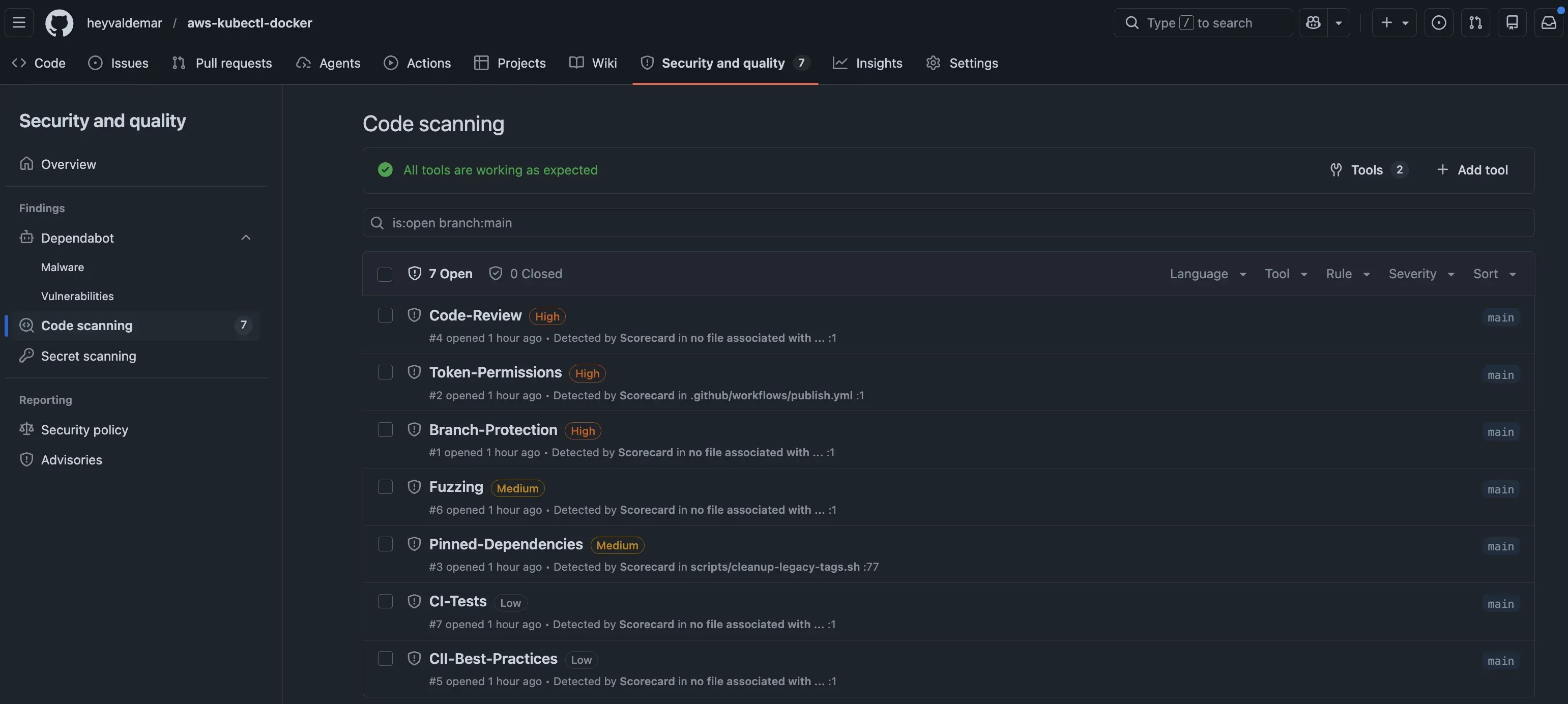
The Scorecard findings that stay open at 7.8 are mostly honest. Code-Review scores 0/10 because I am the only reviewer. Branch-Protection scores 4/10 because I kept the admin bypass for emergency fixes. Fuzzing scores 0/10 because the image is a utility, not an application. These are trade-offs, not oversights. The score reflects them accurately, and that is the point of the program.
The closing argument
Public Docker images inherit the supply chain obligations of the projects that pull them, whether the maintainer accepts the responsibility or not. The tooling to sign, attest, and score an image is free, and the workflows run under 300 lines of YAML. Skip the migration and the cost compounds every month the image stays insecure by default. Run it and the cost is one sustained weekend of work plus about an hour a month afterward.
Sixteen hours once. One hour a month after. Seven hundred thirty thousand pulls protected from whatever compromise ships against the maintainer next.
Pull the image and verify it yourself:
cosign verify heyvaldemar/aws-kubectl:2.0.0 \ --certificate-identity-regexp "https://github.com/heyvaldemar/aws-kubectl-docker/.*" \ --certificate-oidc-issuer "https://token.actions.githubusercontent.com"Every signature, SBOM, and build provenance record is public in GitHub Attestations.
Discussion
If you have hardened a public image past 7.0 on Scorecard, hit a Docker Hub referrers issue in production, or stuck with the do-nothing path and want to argue the cost-benefit, drop a comment below. Counterarguments welcome, and the comment thread is where I respond first. For longer back-and-forth with senior practitioners, join the discussion on Discord.