
Cloudflare Web Analytics on Astro — Why Removing GA4 Unlocked Lighthouse 100
By Vladimir Mikhalev · Docker Captain · CNCF Ambassador · IBM Champion
A Saturday in April. This blog runs on Astro 6 behind Cloudflare, and it was stuck at 88 on mobile Lighthouse. The number had drifted between 83 and 88 over the prior month, depending on image payload. Neither figure passed a Lighthouse CI budget. The cover image needed 4.5 seconds to render on throttled 4G. So I went and looked at the stack. Cloudflare Web Analytics was already getting injected at the proxy layer. On top of that, Google Analytics 4 was pulling in roughly 70 KiB of gtag.js. Two analytics systems on one site. No reason for both.
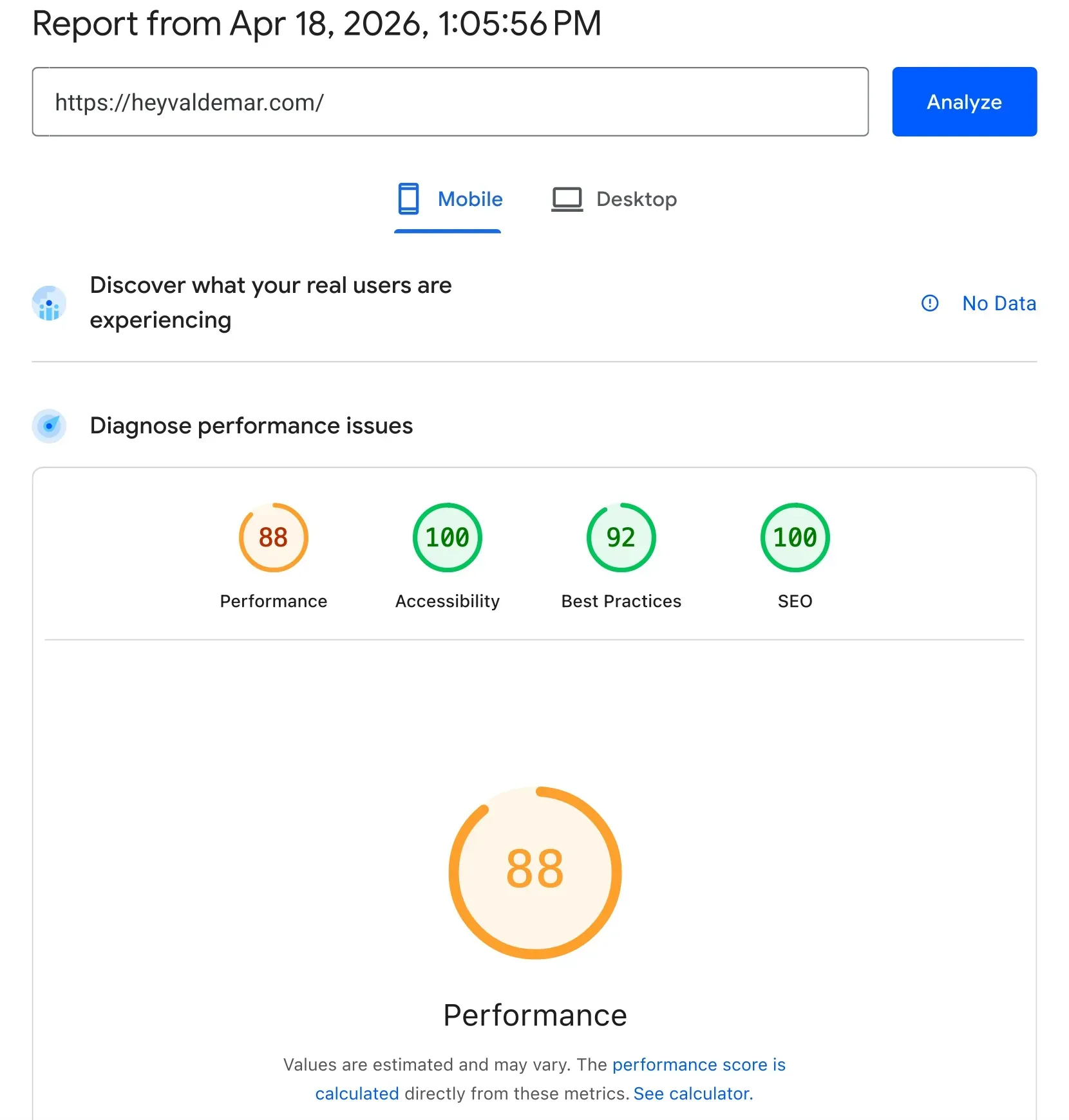
I have watched this exact failure mode repeat across 20+ years of running observability in production. Telecom portals. Banking dashboards. Enterprise SaaS marketing sites. Someone bolts on a new measurement tool before anyone audits what the infrastructure layer already hands you for free. Cloudflare Web Analytics has been running server-side on this domain for over a year. GA4 on top of it was duplicate spend, paid in JavaScript execution time and GDPR exposure. Deleting it closed the Lighthouse gap and killed every third-party cookie in one commit.
What the stacked analytics configuration looks like
The problem rarely shows up in the source diff. It shows up in the Network tab.
A typical Astro layout adds GA4 the standard way, with a tag in <head>:
<!-- Astro layout with Google Analytics 4 (gtag.js) --><script async src="https://www.googletagmanager.com/gtag/js?id=G-XXXXXXXXXX"></script><script> window.dataLayer = window.dataLayer || []; function gtag(){ dataLayer.push(arguments); } gtag('js', new Date()); gtag('config', 'G-XXXXXXXXXX');</script>That buys you roughly 70 KiB gzipped for gtag.js with enhanced measurement on, plus an inline init block, plus third-party requests out to www.googletagmanager.com and www.google-analytics.com. Lighthouse flags the lot under “Reduce unused JavaScript”, even on a site that never fires a single custom event.
The replacement is nothing:
<!-- Cloudflare Web Analytics: no client script required --><!-- beacon.min.js is injected by Cloudflare proxy when --><!-- orange-cloud DNS is enabled. CSP must allow --><!-- static.cloudflareinsights.com in script-src. -->The beacon is injected at the proxy layer, and aggregation happens at Cloudflare’s edge. The client pays for one small beacon instead of a 70 KiB analytics runtime. No cookies get set.
In over twenty years of running observability in production, I have never owned a performance budget where GA4’s gtag.js paid for itself on a content site. Every performance review, same story: flagged, then ignored.
Why this keeps happening
Google Analytics is the default reach. Product managers know the GA4 reports. Marketing knows the GA4 dashboards. Bootcamps teach the GA4 snippet on day one. So it ends up installed even when the CDN layer already gives you analytics, and nobody ever audits the stack for duplication.
Cloudflare Web Analytics lives at the proxy layer. Proxy a domain through Cloudflare with orange-cloud DNS enabled and the static.cloudflareinsights.com/beacon.min.js script gets injected server-side. The beacon is tiny. Aggregation happens at Cloudflare’s edge. No persistent identifier cookies are set by default.
Per Cloudflare’s public documentation, Web Analytics ships on all plans, Free included. It anonymizes IP at the edge and sets no tracking cookies. That puts it outside the default scope of most cookie consent requirements. Your team still needs its own legal review for its own jurisdiction, though. Always.
Risk and blast radius
Direct exposure breaks into three categories.
First, GDPR and ePrivacy. GA4 uses cookies and processes personal data, which means explicit consent in the EU and UK, and increasingly under US state privacy laws too (CCPA, VCDPA, CPA). Cloudflare Web Analytics runs without tracking cookies. Back in February 2022, CNIL in France ruled that Google Analytics deployments can fall outside GDPR compliance, specifically over data transfers to the United States.
Second, the performance budget. That is 70 KiB of JavaScript to parse and execute on every first page load. Main-thread work spikes on mid-tier Android.
Third, data sovereignty. GA4 data sits in Google infrastructure, US by default.
The systemic exposure is the bigger one. Every page, every visit, carries the runtime cost. Take a 1,000-page documentation site serving 100K monthly visitors: that is real energy spent, latency added, and a permanent third-party dependency parked in the critical render path. Then your cookie consent management platform piles on another 20-50 KiB. Pull GA4 and you often pull the entire reason the CMP exists.
Options compared
| Tool | Client JS (gzipped) | Tracking cookies | Data residency | Price | Fit |
|---|---|---|---|---|---|
| Google Analytics 4 | ~70 KiB | Yes | US (Google) | Free | Funnels, ad attribution, Google Ads integration |
| Cloudflare Web Analytics | 0 additional (edge beacon ~1 KiB) | No | Cloudflare edge | Free on all plans | Traffic, Core Web Vitals, content sites |
| Plausible | ~1 KiB | No | EU (Hetzner) | $9/mo and up | Privacy-first, public dashboards |
| Fathom | ~1.6 KiB | No | EU or Canada | $15/mo and up | Privacy-first, simpler UX |
| PostHog (self-hosted) | 20-50 KiB | Configurable | Your infrastructure | Infra only | Product analytics, session replay, feature flags |
Don’t read the table as “Cloudflare wins.” Read it as the question is what you measure. A content site that needs pageviews and Core Web Vitals lands somewhere very different from an e-commerce funnel that needs attribution down to the ad creative.
Framework: From GA4 to Cloudflare Web Analytics
Layer 1 — Measure (week 1)
- Run Lighthouse on mobile and desktop, capture current scores
- Run PageSpeed Insights and pull CrUX real-user data for LCP p75 if the domain meets the traffic threshold; otherwise use Cloudflare RUM or self-hosted
web-vitalscollection - Open DevTools Network tab and list every third-party origin loaded on the home page
- Check response headers to identify your CDN:
cf-rayfor Cloudflare,x-served-byfor Fastly,x-nf-request-idfor Netlify,x-vercel-cachefor Vercel - Audit the CDN dashboard for built-in analytics you may not have enabled: Cloudflare Web Analytics, Fastly Observability, Netlify Analytics, Vercel Web Analytics
Owner: platform engineer or senior frontend.
Layer 2 — Remove (week 2)
Remove any analytics tool that duplicates what the CDN already provides.
Update CSP to allow the CDN beacon origin. For Cloudflare:
# CSP for Cloudflare Web Analytics on Astro + Cloudflare proxyContent-Security-Policy: default-src 'self'; script-src 'self' 'unsafe-inline' https://static.cloudflareinsights.com; connect-src 'self' https://cloudflareinsights.com; img-src 'self' data:; style-src 'self' 'unsafe-inline';Add fetchpriority="high" to the LCP image, meaning the hero image, first post card, or above-fold banner:
<!-- LCP candidate, Astro first-post card --><img src="/images/posts/first-post.webp" alt="First post cover" fetchpriority="high" loading="eager" width="1200" height="675"/>Then audit every <link rel="preconnect"> and delete origins that aren’t in the critical render path. A dead preconnect steals a TCP slot from an origin that actually matters.
Owner: frontend lead plus security for CSP review.
Layer 3 — Gate in CI (week 3 onward)
Add Lighthouse CI to the build pipeline. Fail the build on regressions:
# .github/workflows/lighthouse.yml — Lighthouse CI gatename: Lighthouseon: [push, pull_request]jobs: lhci: runs-on: ubuntu-latest steps: - uses: actions/checkout@v4 - uses: actions/setup-node@v4 with: { node-version: 20 } - run: npm ci && npm run build - uses: treosh/lighthouse-ci-action@v11 with: urls: | https://heyvaldemar.com/ https://heyvaldemar.com/latest-post/ budgetPath: ./budget.json uploadArtifacts: trueWatch Cloudflare RUM p75 LCP weekly. Synthetic Lighthouse is a benchmark, not the truth. Real users on newer phones over better networks usually come in 30-50% faster than the Moto G Power / Slow 4G synthetic model.
Add a pre-push Git hook that runs astro check && astro build so a broken build never reaches the remote:
#!/usr/bin/env bash# .git/hooks/pre-push — block push on failed Astro buildZERO_SHA="0000000000000000000000000000000000000000"while read -r local_ref local_sha remote_ref remote_sha; do # Skip verification on branch delete [ "$local_sha" = "$ZERO_SHA" ] && exit 0donenpx astro check && npx astro buildOwner: platform engineer.
Tradeoffs
Cloudflare Web Analytics does less than GA4. No funnels. No deep custom event schemas. No native Google Ads integration. For content sites, documentation, and most engineering-led blogs, none of that is a loss you will feel. Conversion-heavy e-commerce with retargeting pipelines is the exception, where GA4 might still earn its weight, though even there the stronger answer is usually a privacy-first product analytics tool (Plausible, Fathom, or self-hosted PostHog) over client-side GA4.
The other tradeoff is CDN alignment. Move the site off Cloudflare and the beacon goes with it. That is not a hard lock-in, since competing CDNs ship their own first-party analytics, but it is worth naming in any architecture review.
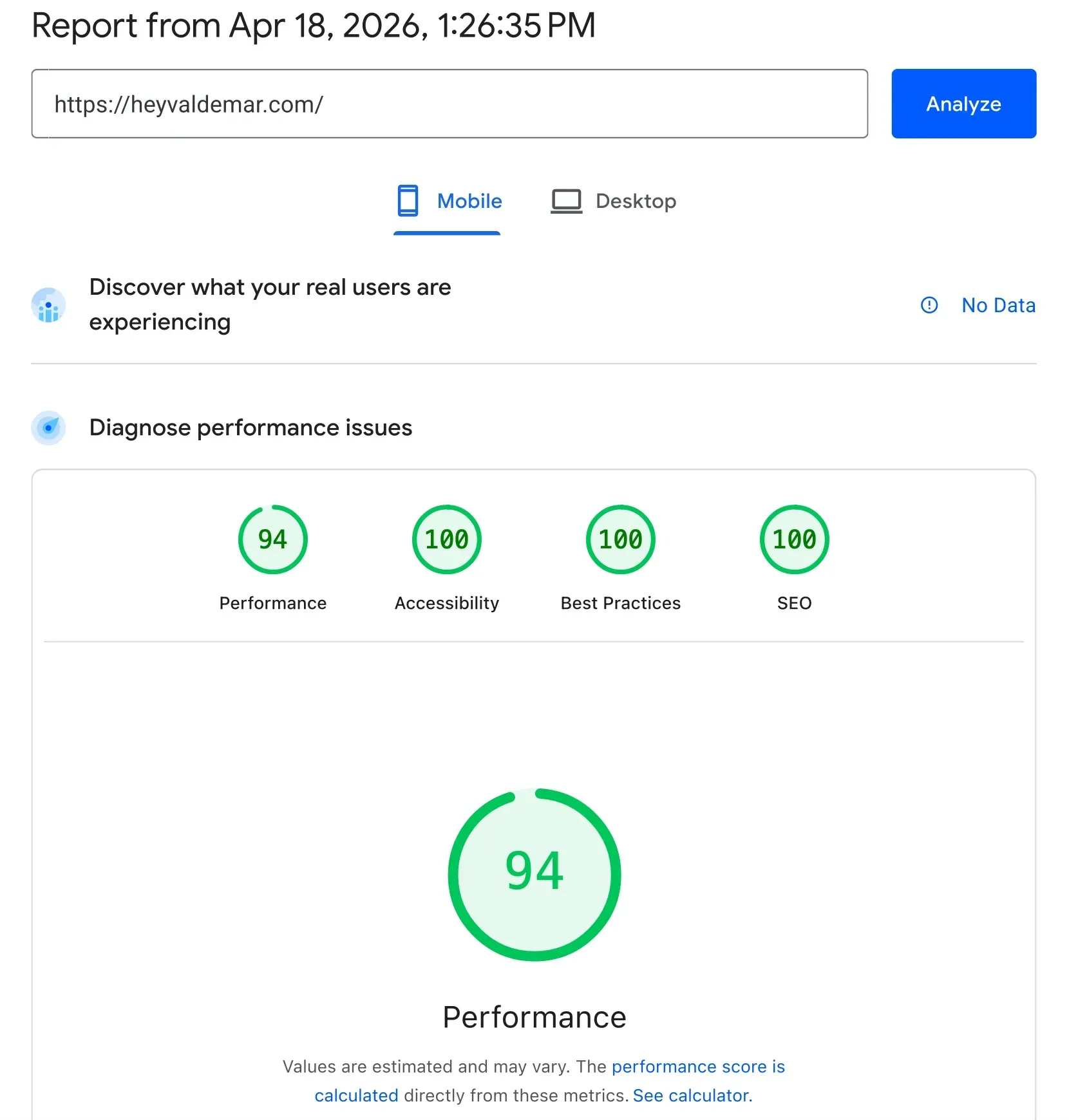
The cost of the alternative is concrete. 70 KiB of JavaScript on every pageview. A cookie consent banner. GDPR exposure. A standing regression against any performance budget you set. On mid-tier Android over a mid-tier network, that 70 KiB is a real LCP penalty. I have watched Lighthouse scores camp at 92-94 for months because a team would not question the GA4 install.
The closing argument
The strongest case against GA4 on a content site in 2026 is not privacy, and it is not performance. It is supply chain. Every third-party script in your critical render path is code you did not write, cannot audit, and still inherit the blast radius of. Cloudflare Web Analytics is not better because it is faster. It is better because it is one fewer trust boundary.
The privacy alignment is a bonus. The LCP improvement is a bonus. The actual architectural position is simpler: observability tooling should come from the infrastructure layer you already trust, not get bolted on top of it.
Sources
- Web.dev, “Fetch priority to improve LCP”, https://web.dev/articles/fetch-priority, 2024
- Cloudflare, “Web Analytics product documentation”, https://developers.cloudflare.com/web-analytics/, ongoing
- Google, “gtag.js reference”, https://developers.google.com/tag-platform/gtagjs/reference, ongoing
- CNIL (France), “Use of Google Analytics and data transfers to the United States”, https://www.cnil.fr/en/use-google-analytics-and-data-transfers-united-states-cnil-orders-website-manageroperator-comply, February 2022
- Astro Docs, “Image optimization”, https://docs.astro.build/en/guides/images/, ongoing
Discussion
If you have removed GA4 on a production site, or kept it and have the numbers to justify it, drop a comment below. Counterarguments welcome. For longer back-and-forth with senior practitioners, join the discussion on Discord.