
What is the Cloud?
By Vladimir Mikhalev · Docker Captain · CNCF Ambassador · IBM Champion
Straight answer first.
The cloud isn’t magic. It’s not a revolution, and it’s definitely not new. It’s rented computers. Someone else’s datacenter, wrapped in APIs and billing dashboards and enough marketing jargon to make your eyes bleed.
Doesn’t mean it doesn’t matter.
If you build, deploy, or run software today, you’re in the cloud whether you like it or not. So here’s the plain version, no Gartner-speak: what you’re using, what you’re paying for, and where the real complexity hides.
Flashback: the cloud is just the mainframe all over again
Back in the `60s, computing was a shared service. You didn’t own a computer. You bought time on one. Batch jobs, punch cards, big centralized boxes.
Then personal computers showed up. Then client-server. Then web apps. And eventually, surprise, we looped right back around.
“The Cloud” is just mainframes for the modern age, except this time it’s running on someone else’s rack, and you pay by the second.
It scales, too. And it usually works.
Cloud = renting what you used to buy
Say you want to deploy an app. In the pre-cloud world, you’d:
- Buy a physical server
- Rack it
- Install Linux
- Set up firewalls, monitoring, backups, etc.
- Wait 3 weeks for procurement
Now? You open AWS, click a few buttons (or better, run terraform apply), and a server in Singapore is running your code inside of minutes.
That’s the whole idea: pay-as-you-go access to computing resources. No upfront hardware. No maintenance contract. No yelling at procurement.
The three cloud models, minus the sales pitch
This is where the industry loves to chuck acronyms at you. SaaS, PaaS, IaaS. I’ll walk them like an engineer would, not a vendor.
1. IaaS: Infrastructure as a Service
What you get: VMs, storage, networks. What you manage: Everything above the OS. Example: AWS EC2, Azure VMs, GCP Compute Engine
Think of it as a raw Linux box in the sky. You do the rest.
Setting up your own PostgreSQL cluster on Ubuntu in AWS? That’s IaaS.
Real-world use case:
aws ec2 run-instances --image-id ami-xxxx --instance-type t2.mediumFlexible. But the burden’s all yours. You patch it. You scale it. You secure it.
2. PaaS: Platform as a Service
What you get: A managed environment to run your code. What you manage: Just your app. Example: Heroku, OpenShift, Google App Engine
This is cloud with training wheels, and I mean that as a compliment. The OS and runtime aren’t your problem anymore. You deploy your app and go.
Real-world example:
git push heroku mainBoom. App deployed.
Great when you want to ship fast. Less great when you need low-level control.
3. SaaS: Software as a Service
What you get: Fully managed apps. What you manage: Nothing. Just your data and usage. Example: Google Workspace, GitHub, Dropbox, Jira
You already live in SaaS. Your email runs on it. So does your ticketing system. That weird dashboard your CFO keeps exporting to Excel? SaaS, no question.
You don’t control the code. That’s the entire point.
Who’s responsible for what?
Memorize this chart.
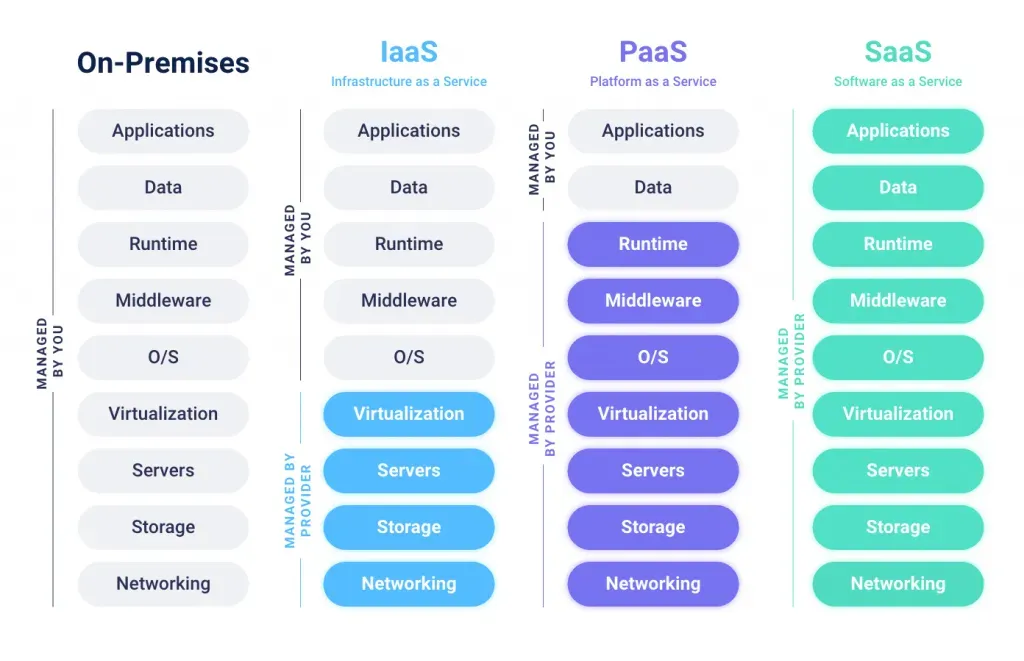
- On-prem? You manage everything.
- IaaS? You still manage OS and above.
- PaaS? Just your code.
- SaaS? Nothing but your login credentials.
Wondering why your team spends all day patching EC2s? Congrats. You’re in IaaS-land.
So… why bother with the cloud?
Three reasons.
- Elasticity - Scale up for Black Friday, scale down on Monday. Try doing that with a rack of Dell boxes.
- Speed - From idea to deployment in minutes, not months.
- Focus - Spend less time babysitting hardware and more time shipping features.
Tools of the trade
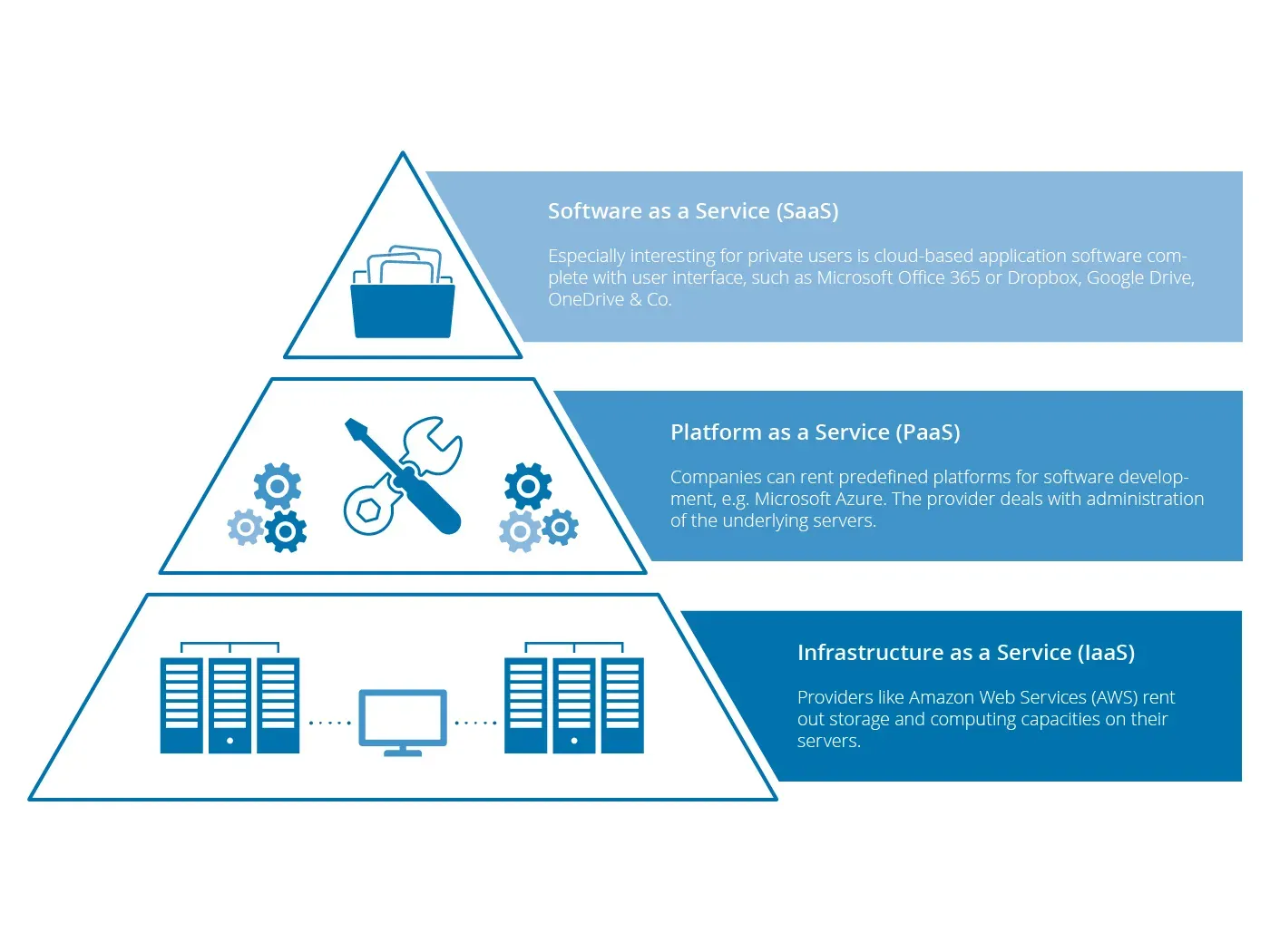
Here’s how cloud use shakes out across the stack:
And here’s how we actually build on it:
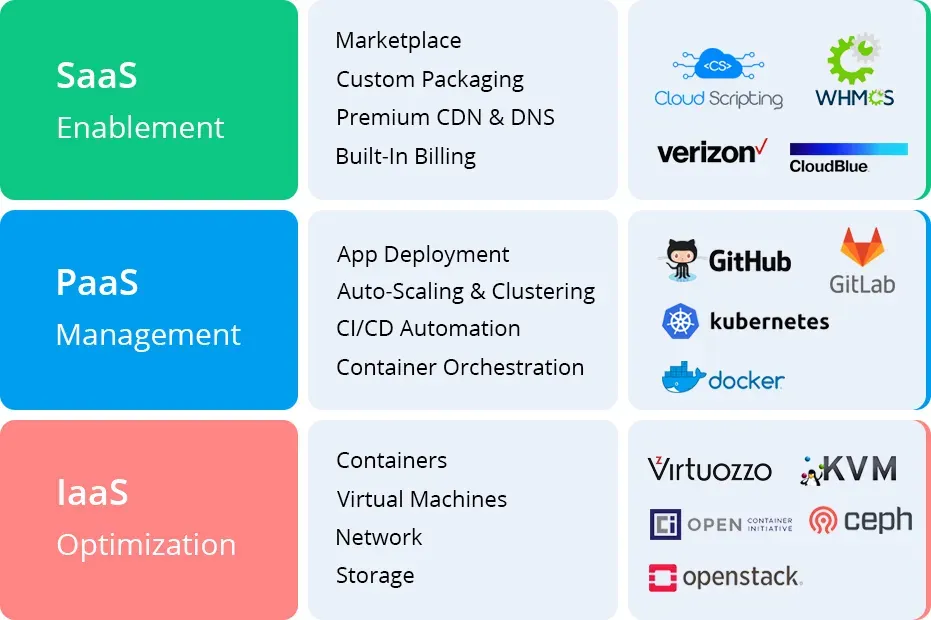
Want portability? Use containers. Need repeatability? Use Terraform. Scaling headaches? Hand them to managed services.
Final thought: the cloud is someone else’s problem… until it’s yours
You don’t have to love the cloud. But you should know where it helps you, and where it turns around and bites.
Because every abstraction leaks. Every managed service eventually hands you a curveball. And “serverless” never meant ops-less.
Know what you’re actually running. That’s how much control you keep when things break.
TL;DR
- Cloud = rented infrastructure with APIs and billing.
- IaaS = VMs and control, but with responsibility.
- PaaS = fast deploys, less control.
- SaaS = just use the app, don’t ask how it works.
- The cloud isn’t new. It’s just better branded mainframes.
- Know your layer, know your risks, use the right tool for the job.
What next?
Deploying apps? Pick a platform that fits your team’s skill and scale. Teaching juniors? Walk them through the responsibility split across SaaS/PaaS/IaaS. Building infra? Godspeed, and may your Terraform plans never fail in prod.