
228 words
1 min read
Optimal Active Directory Structure
By Vladimir Mikhalev · Docker Captain · CNCF Ambassador · IBM Champion
Here’s a proven Active Directory (AD) structure commonly used by large organizations, including enterprises with over 10,000 employees globally. Such environments typically implement a domain tree structured by country or continent.
Example domain hierarchy
- Root domain:
heyvaldemar.net - Child domains:
canada.heyvaldemar.net,ireland.heyvaldemar.net
Each domain in the tree follows a consistent internal structure.
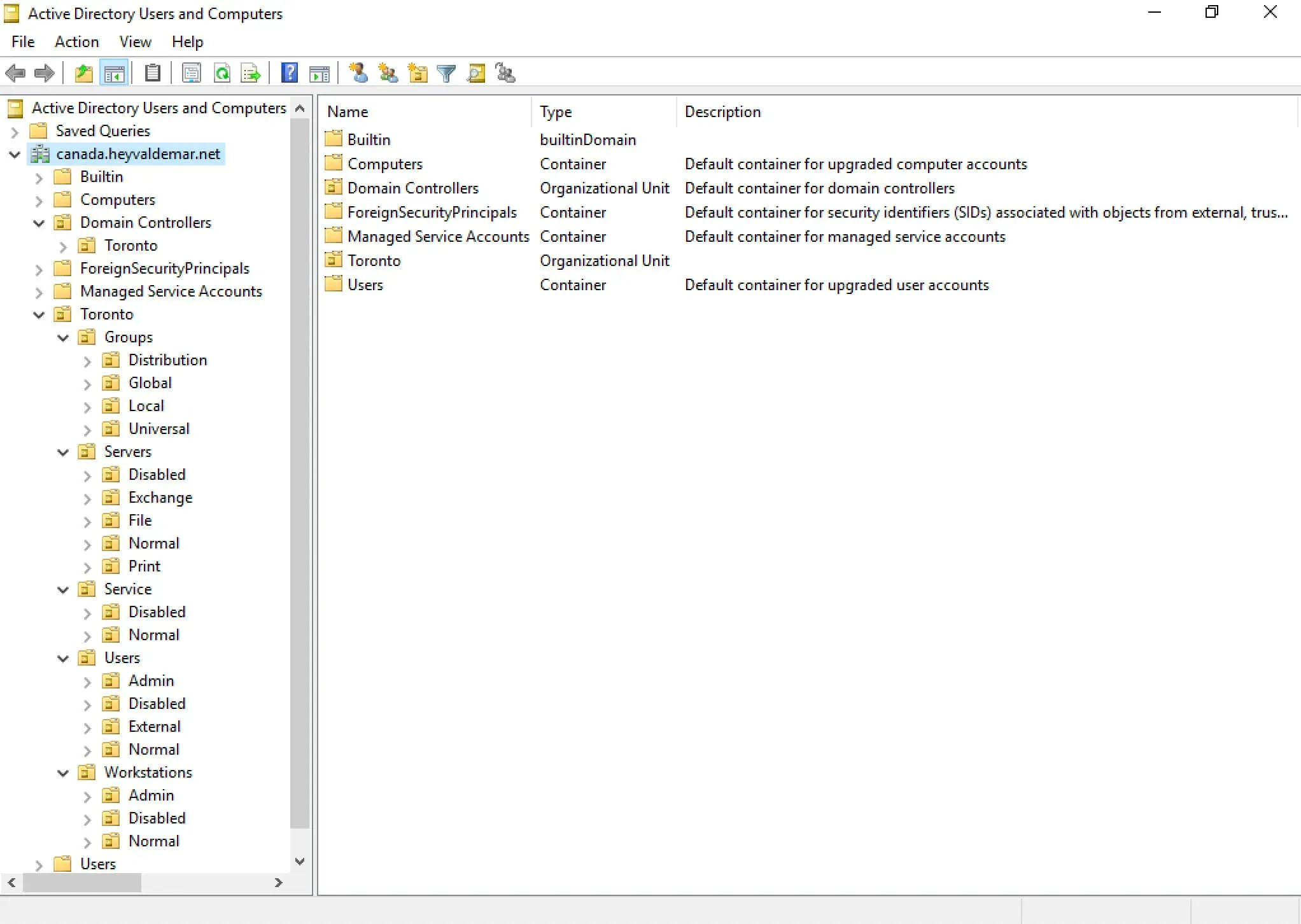
Domain-Level Organization by City
- Toronto (City of Toronto)
City-Level OUs by Object Type
- Groups - All security and distribution groups
- Servers - All server objects
- Service - Service accounts used to run applications
- Users - End user accounts
- Workstations - User endpoints
Groups - Organized by Scope
- Local - Domain-local groups
- Global - Global groups
- Universal - Universal groups
- Distribution - Non-security mail groups
Servers - Organized by Service Role
- Disabled - Decommissioned or inactive servers
- Exchange - Microsoft Exchange servers
- File - File servers with shared resources
- Normal - General-purpose servers
- Print - Print servers
(More categories can be added based on operational needs.)
Service Accounts - Organized by Role
- Disabled - Inactive service accounts
- Normal - Active service accounts used in production
User Accounts - Organized by Role
- Admins - Elevated-privilege accounts
- Disabled - Former employees or inactive accounts
- External - Contractors or third-party users
- Normal - Standard user accounts
(Expand categories as needed for your organization.)
Workstations - Organized by User Role
- Admins - Devices used by admin accounts
- Disabled - Retired or unused machines
- Normal - Standard user workstations
Final Note
This structure provides a scalable, secure, and easily manageable AD layout — ideal for delegation, policy application, and compliance.